OtoZen: Family Locator & GPS
Sensovium Inc.Parenting
3.835.00 Reviews
- Version
- 1.4.6
- Installs
- 10.00K
- Age Rating
- Everyone
Screenshots
Our Review of OtoZen: Family Locator & GPS
 Analysis by Appyee
When a family is constantly coordinating school pickups, evening drives, and last-minute changes, a shared location can be genuinely useful—but it also asks everyone to think about privacy. That balance is what I would consider before installing OtoZen: Family Locator & GPS. It is a free parenting app from Sensovium Inc., with a 3.8 average from around 120 ratings and more than 10,000 installs. Its focus is family location and driving safety, so it makes most sense when relatives agree on why they are using it and when sharing is appropriate.
Trust starts with clear expectations
A locator can reassure a parent, but the same map can feel intrusive to a teenager or another adult if nobody has discussed its purpose. I would start with a family conversation, not with tracking: explain what everyone hopes to solve, who will be in the circle, and whether location sharing is intended for everyday coordination, travel, or a particular safety concern. That agreement matters more than any notification setting.
The app’s description points to live location and driving safety alerts, but a reviewer should not treat a general promise of safety as a guarantee. Location is useful information, not proof that someone is safe, and an alert is not a substitute for calling emergency services or checking in directly when a situation feels urgent. I would use the app as one practical layer in a family plan rather than the plan itself.
Make the circle useful, not crowded
Before inviting everyone, decide who actually needs access. A small circle can be easier to understand than adding relatives simply because they are family. For a school-age child, a parent or guardian may need a different arrangement than an adult sibling who only wants to share location during a long drive. Keeping the group focused can reduce confusion about who can see whom and why.
It is also worth agreeing on what to do when a location appears stale or unexpected. Ask the person to check in before assuming something is wrong; phones can be unavailable, and map information should not be read as a live conversation. This simple rule can prevent a routine delay from turning into a string of worried messages.
Getting Started with OtoZen
Diving into OtoZen: Family Locator & GPS is as easy as pie. The setup process is super straightforward. You download the app, set up your profile, and invite your family members to join your circle. What’s cool is that it’s compatible with both Android and iOS—so no one’s left out in the cold.
Once you’ve got everyone on board, you can start tracking their location in real-time. And don’t worry, it’s not as creepy as it sounds. The app is designed to foster communication and safety, not to snoop on your loved ones.
A Peek into the Features
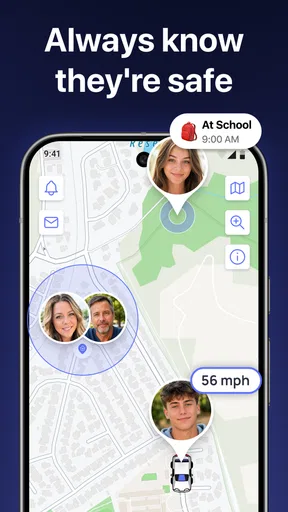
The app is packed with features that make it more than just a basic GPS tracker. Firstly, the real-time location tracking is precise and updates quickly, so you know exactly where everyone is. I found this particularly useful during our last family outing when the kids decided to explore the park on their own.
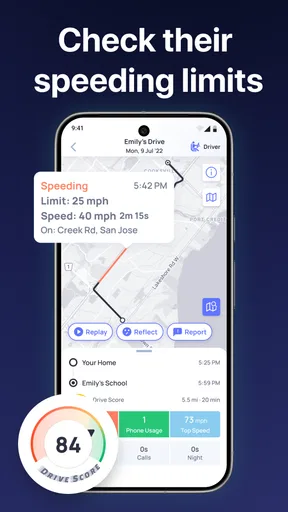
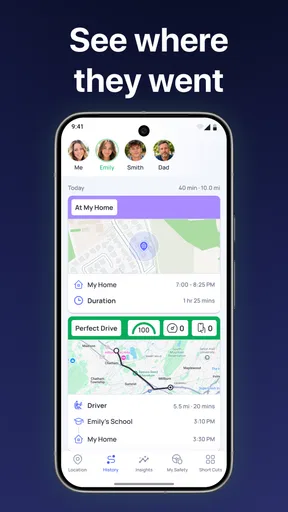
Then there’s the trip history function. This is great for reviewing past journeys, which can be super handy for keeping track of driving routes and times. You can even use it to ensure everyone is sticking to the planned schedule.
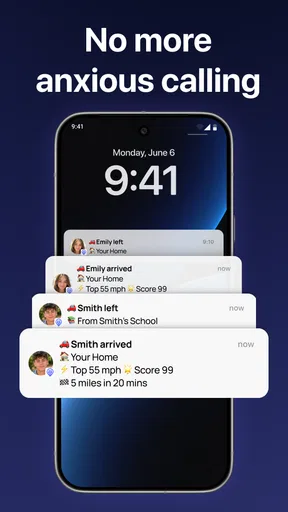
One of my favorite features is the ability to create safe zones. You can set up specific areas, like home or school, and get notifications when someone enters or leaves these zones. It’s like having an extra set of eyes on your loved ones.
Communication and Safety
OtoZen isn’t just about tracking; it’s also about enhancing communication. The app allows you to send messages and alerts easily. Let’s say your kid is at a friend’s house and you need them to head home. You can ping them a quick message through the app. It’s seamless and ensures everyone stays in the loop.
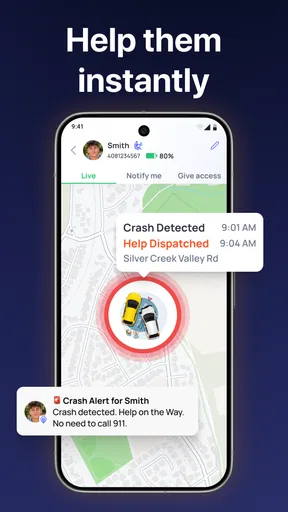
Safety is another biggie with OtoZen. The app offers a SOS button that family members can use if they ever find themselves in a sticky situation. Plus, it integrates with your car for hands-free updates, which means no more distracted driving.
Choose controls deliberately
My practical advice is to set up only the alerts that answer a real question. A home or school boundary can help with a pickup routine; alerts for every familiar stop may create noise that everyone learns to ignore. Treat the first few days as a trial: notice which notifications change what you do, then adjust the routine rather than checking the map out of habit.
Driving is another moment to be deliberate. If the app is part of a car routine, decide before leaving who will handle any setup or messages. The driver should not be looking at a phone while moving. Hands-free tools can support safer habits, but they do not make every interaction safe or remove the need to follow local road rules.
Everyday use is about coordination
Picture a weekday when a child is leaving an activity and a parent is stuck in traffic. A location check can help the parent decide whether to continue toward the usual pickup point or make a quick call to coordinate a change. The useful outcome is not watching the map minute by minute; it is avoiding a string of “Where are you?” texts and making a calmer plan.
For a road trip, trip history can be more helpful after the drive than during it. A family can look back at a route to remember where a stop happened or compare the journey with the plan. I would avoid turning that record into a scorecard for a driver: context matters, and a route history alone cannot explain why someone took a particular road or paused.
Safe zones can also be set around places that matter to your own routine rather than every destination. Home and school are obvious examples, but the real test is whether an arrival or departure alert saves someone from needing to check in manually. If it does not change a decision, it may not be worth keeping enabled.
How it differs from simpler options
Compared with texting or calling, a family locator can answer a narrow question—roughly where a person is—without requiring them to reply immediately. That is useful when someone is driving or busy, but it is less personal than a conversation and cannot clarify plans. I would keep ordinary calls and messages as the main way to discuss changes, using location to fill in just the logistical gap.
Compared with a phone’s built-in location sharing, this app is more specifically oriented toward family coordination and driving safety. Whether that focus is worth adopting depends on the tools your household already uses. If everyone is comfortable with a built-in option and only needs occasional sharing, adding another app may create a second circle to maintain. If you want a dedicated family setup and make use of its driving-oriented features, OtoZen may be a better fit.
It is not the right choice for someone who wants a covert tracker. Location sharing should be understood by the people involved, and the app’s value depends on trust and consent. It is also a poor fit if the family expects a locator to replace check-ins, handle emergencies automatically, or provide certainty about someone’s wellbeing. In those cases, direct communication and a clear safety plan matter more.
Costs, compatibility, and practical checks
The app is free to install, while in-app purchases range from about $5 to $130 per item. I would check the purchase details in the app before committing to anything and decide whether the free experience already covers the family’s needs. A family locator is only useful if people keep it installed and agree to use it; paying for something before testing the household routine would be premature.
It is rated for everyone, runs on Android starting with version 8.0, and is currently at version 1.4.6. Since family members may use different phones, it is sensible to confirm compatibility on each device and make sure each person can complete setup before relying on the app for a trip or pickup. The app is available across Android and iOS, which can help mixed-device households, but a compatible phone does not by itself guarantee that a family member is comfortable sharing location.
Why OtoZen Stands Out
What sets OtoZen apart from other family locator apps is its user-friendly interface and the peace of mind it offers. It’s not bogged down with unnecessary features that confuse you. Instead, it focuses on what matters most—keeping your family connected and safe.
Moreover, the app respects privacy by allowing users to manage their location settings. Each family member can choose when they share their location, which is a relief for those who value their privacy.
Privacy needs a recurring check
Location sharing is not a one-time decision. A child’s routine changes, an adult may no longer need to be in the circle, and a temporary trip arrangement may not make sense after the trip. I would revisit who is included and what sharing is for whenever family circumstances change. That keeps the tool tied to a current need rather than letting it become an unexplained background habit.
Before relying on any safety app, I also recommend reviewing the choices shown during setup and in the app itself, including location controls and purchase prompts. I would not assume that a feature name tells the whole story about how it works. If a family member has questions about what they can control, resolve those questions together before treating the app as part of a daily routine.
Final Thoughts
So, is OtoZen: Family Locator & GPS worth it? In my book, absolutely. It’s a practical, reliable app that does exactly what it promises. Whether you’re a parent wanting to keep tabs on your kids or just someone who likes to stay connected with family, this app is a solid choice.
It’s not just about tracking locations; it’s about enhancing family communication and safety in our busy, modern lives. So go ahead, give it a whirl, and see how it fits into your family’s routine. You might just wonder how you ever managed without it!
A cautious recommendation
I would recommend trying it when several family members genuinely want a shared way to coordinate, especially around school journeys, pickups, and drives. Its combination of location, trip history, boundaries, messaging, and driving-related tools gives it a more focused role than a plain map share. Sensovium Inc. has built it for a recognizable family need, and its modest rating suggests opinions are not uniformly glowing; I would test it with a small circle and judge it by how well it fits your household rather than expecting it to solve every safety concern.
My short version: use it openly, keep the circle intentional, and let real routines determine which controls stay on. Skip it if your family is uncomfortable with location sharing or already has a simpler system that everyone uses reliably. For households that want a dedicated locator and are willing to agree on boundaries, it can be a helpful extra—not a substitute for trust, judgment, or a direct conversation.
Verdict
Strengths of OtoZen: Family Locator & GPS
- Real-time location tracking enhances safety.
- User-friendly interface simplifies navigation.
- SOS alerts provide quick emergency response.
- Customizable geofences for location alerts.
- Minimal battery consumption for continuous use.
Limitations of OtoZen: Family Locator & GPS
- Requires constant internet connection.
- Limited features in free version.
- Privacy concerns with location sharing.
- Occasional GPS accuracy issues.
- Notifications can be overwhelming.
Similar Picks in This Category
View All
Family Space
Motorola Mobility LLC.3.9

شرطة الأطفال - مكالمة وهمية
Oub Apps4.1

Findmykids: Parental Control
LETEM LTD4.6

Pregnancy + | Tracker App
Philips Electronics UK Limited4.8

Policía de niños - para padres
Kids police4.7

Pregnancy App
Amila4.9
Frequently Asked Questions
What is OtoZen and how does it work?
OtoZen is a family locator and GPS app designed to enhance safety and connectivity for families. It allows users to track the real-time location of family members, set up geofences for notifications when someone arrives or leaves a designated area, and share ETA information. The app uses GPS technology to provide accurate location data and offers features like driving safety alerts and location history.
Is OtoZen secure and does it protect user privacy?
Yes, OtoZen prioritizes user privacy and employs encryption to protect location data. It only shares location information with authorized family members or individuals, ensuring data is not accessible by unauthorized parties. Users have control over who can view their location, and the app complies with privacy regulations to safeguard personal information.
What features does OtoZen offer for family safety?
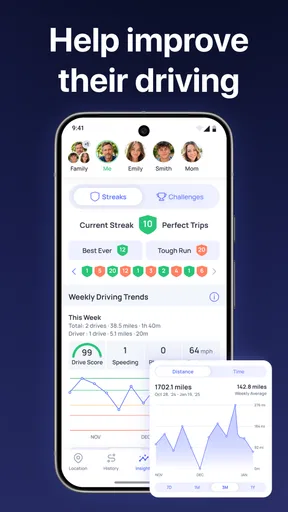
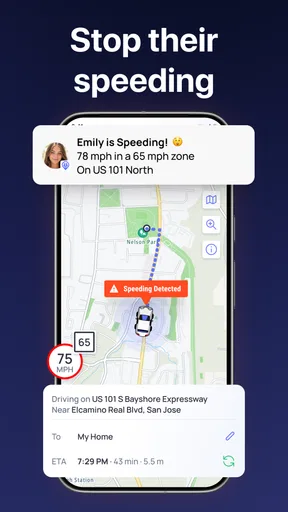
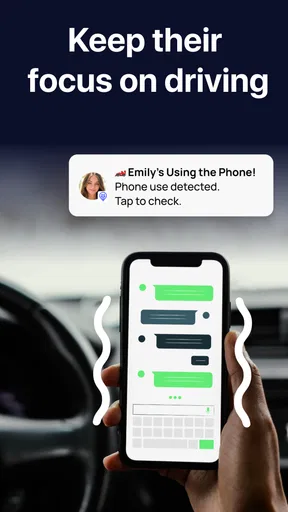
OtoZen includes several features to enhance family safety, such as real-time location tracking, geofencing alerts, and driving safety notifications. It allows users to receive alerts when family members reach specific locations, monitor driving habits, and get notified about speeding or phone usage while driving. These features help families stay connected and informed about each other's whereabouts.
How user-friendly is the OtoZen app?
OtoZen is designed with user-friendliness in mind, offering an intuitive interface that is easy to navigate. Users can quickly set up family groups, manage settings, and access location information with minimal effort. The app provides clear instructions and support to help users make the most of its features, making it suitable for all age groups.
Is OtoZen compatible with both Android and iOS devices?
Yes, OtoZen is available for both Android and iOS platforms, ensuring compatibility with a wide range of smartphones and tablets. Users can download the app from the Google Play Store or Apple App Store, and it provides seamless functionality across different devices, allowing family members to stay connected regardless of their preferred operating system.
